
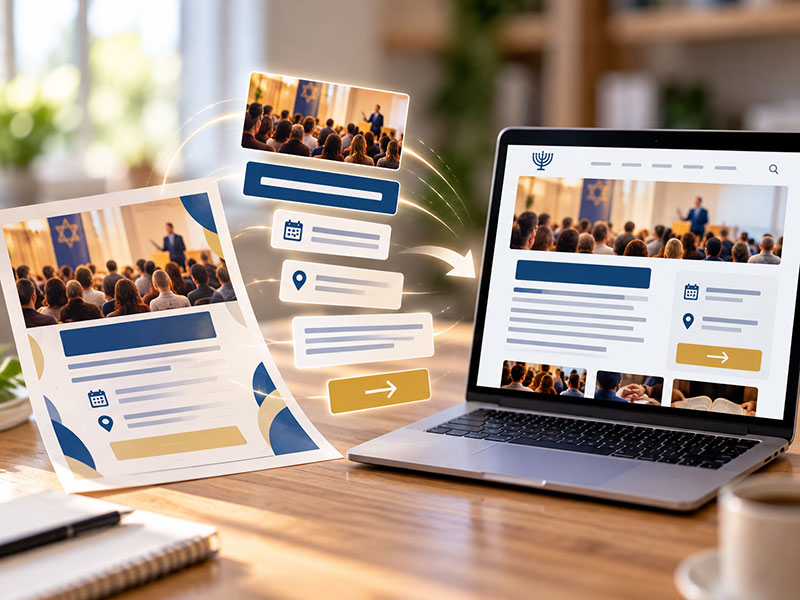
Someone sends you a flyer for an upcoming synagogue event.
It looks great.
There’s a strong photograph, an eye-catching headline and all the information someone needs to attend.
Now you need to put it on the website.
The easiest thing to do is upload the flyer as an image.
But there’s a better approach:
Don’t post the flyer. Take it apart.
Everything you need to create an effective event promotion on your website is probably already there. You simply need to take the ingredients that were designed for print and reassemble them in a format designed for the web.
Here’s how.
Step 1: Start With the Event Title
Your flyer probably already has a prominent headline.
Use it as the event title on the website.
Keep it clear and descriptive. Someone should be able to understand what the event is without needing to examine the artwork surrounding it.
That title should be actual text on the page — not text embedded within an image.
That makes it easier to read, particularly on a phone, and gives your event a clear heading that can be used throughout the website.
Step 2: Pull Out the Essential Information
Next, identify the information someone needs at a glance.
Usually, that’s:
- Date
- Time
- Location
- Cost, if applicable
- Registration deadline, if there is one
Don’t make visitors hunt through several paragraphs to find these details.
One advantage of converting a flyer into actual website content is that you can establish a consistent format for every event.
Visitors learn where to look.
The date is always here. The location is always there. The registration button is always obvious.
That’s much easier to use than a collection of flyers where every designer decided to put the information somewhere different.
Step 3: Turn the Flyer Copy Into a Real Description
Most flyers contain some explanation of the program.
Use it.
But don’t assume the copy needs to remain exactly as it appeared on the flyer.
Print space is limited, so flyer copy may be heavily condensed. Other flyers go in the opposite direction and try to squeeze far too much information onto the page.
The website gives you more flexibility.
Start with a short paragraph explaining what the event is and why someone might want to attend.
Then provide additional information if it’s useful.
For a guest speaker, that might include a biography.
For a community dinner, you might explain what’s included and who is invited.
For a holiday program, you might provide information for families attending with children.
You’re no longer trying to fit everything onto an 8½-by-11-inch page.
Take advantage of that.
Step 4: Rescue the Best Visual From the Flyer
You don’t need to throw away all the design work that went into the flyer.
If there’s a strong photograph, illustration or graphic, use it.
Just separate it from the text.
Instead of uploading one image containing the photograph, event title, description, date, location, contact information and registration instructions, use the photograph or artwork as the event’s featured image.
Then let the website handle everything else.
This gives you the best of both worlds.
The event retains the visual personality of the original promotion while the information remains readable and usable.
Step 5: Replace Printed URLs and QR Codes With Actual Links
A printed flyer may say:
Register at example.org/register.
Or it may include a QR code.
Those solutions make sense in print because a piece of paper can’t contain a clickable button.
A website can.
Replace those instructions with a clear call to action:
Register Now
RSVP
Purchase Tickets
Learn More
The same goes for email addresses.
Instead of displaying an address someone needs to copy and paste, make it clickable.
The website should eliminate steps that were necessary in print — not reproduce them.
Step 6: Put the Registration Process Online
If the event requires registration, make the process as direct as possible.
Someone who’s interested in attending shouldn’t need to print a form, call the synagogue office or send an email asking how to register.
Ideally, the event page should lead directly to an online registration form.
If there’s a fee, visitors should be able to pay online when appropriate.
The exact system may vary. Your registration could be handled through the synagogue website, ShulCloud or another platform.
What matters to the visitor is that the path is obvious:
I want to attend → here’s how I register.
Step 7: Give the Event Its Own URL
One of the biggest advantages of creating an actual event listing is that the program now has a webpage of its own.
That URL becomes useful everywhere else you’re promoting the event.
Your weekly email can link to it.
Your social media posts can link to it.
A staff member can send it to someone asking for more information.
Another community organization can share it.
And when details change, you update them in one place.
You don’t need to redesign a flyer, generate a new image and redistribute it everywhere.
The website becomes the reliable source for the latest information.
Step 8: Use the Website to Create Different Levels of Detail
One of the limitations of a flyer is that everything has to fit in one place.
A website doesn’t work that way.
You can promote the event briefly on the homepage:
Event title + date + photograph + short description + button
Then provide the full details on the event page.
And you can list the same program even more compactly in a calendar.
It’s the same event presented differently depending on where someone encounters it.
That’s one of the things websites do particularly well.
You don’t have to choose between providing too little information and cramming everything into one space.
Step 9: Think About What Happens After the Event
Flyers have a natural expiration date.
Web content should, too.
Once the event is over, it shouldn’t continue appearing among your upcoming programs or remain prominently displayed on the homepage.
A good event system can handle much of this automatically.
Upcoming events appear where they’re supposed to appear. Once their date passes, they disappear from those areas without someone needing to remember to remove them manually.
The event page itself may remain available as an archive if there’s a reason to keep it.
This is another advantage of treating events as structured website content rather than a collection of uploaded images.
One Event, Different Mediums
The original flyer still has a job.
Print copies for the synagogue lobby.
Include it in a bulletin.
Share an appropriately sized version on social media.
Attach it to an email if that’s useful for your congregation.
But when the event reaches the website, translate it into the language of the web.
The photograph becomes a featured image.
The headline becomes a page title.
The event details become readable text.
The printed URL becomes a button.
The QR code becomes unnecessary.
The RSVP instructions become an online form.
And the entire event gets a URL that can be shared everywhere else.
You aren’t throwing away the flyer.
You’re adapting it.
That’s the key.
The same event can — and should — be presented differently depending on where people encounter it.
A flyer should work like a flyer.
An email should work like an email.
A social media post should work like a social media post.
And your synagogue website should work like a website.